
Webflow Reverse Proxy Overview: What It Is, Why It Matters, and When to Use It
This is Article 1 in my Reverse Proxy Series.
Reverse proxies are the gateway drug to Webflow Enterprise. Almost every enterprise project I’ve been involved in has implemented it in some form.
They’re the Swiss Army knife that lets you rethink the process for massive projects and build the kind of enterprise setups that get you the good contracts.
This series of guides/articles/words should cover everything you need to know, from a basic “hello world” reverse proxy to a tested client-ready repo.
First. I want to translate “Webflow Enterprise” into my own words. From my experience, Webflow Enterprise simply means:
“High risk, high reward, high complexity Webflow projects. Bypassing the limits of Webflow and pushing the boundaries in terms of size and complexity for brands with sophisticated online marketing.”
Reverse proxies are one of many tools that help you manage that complexity.
Companies that are serious about their online marketing will have many web initiatives in different places.
Marketing is about experimentation. Teams are constantly testing new ideas and trying things. It’s unlikely that a company will have everything on one platform.
In reality, they’ll have a main marketing site somewhere easy to edit (Webflow in our case), a blog / thought leadership in a CMS that’s relatively easy to edit, most likely Wordpress, a selection of short term marketing campaigns across the web, their main web app and maybe a help center.
Putting each of these on their own subdomain doesn’t cut it. That’s split SEO authority and a confusing user experience. These companies need everything on their main domain
The only way we can get all these initiatives into the main domain is with a reverse proxy.
What Is a Reverse Proxy?
A reverse proxy is a router for your domain
When someone visits your site, instead of going directly to Webflow, they hit your reverse proxy first. This little piece of JavaScript looks at what they're asking for and decides where to get it:
- domain.com → Fetch from Webflow (main.domain.com)
- domain.com/blog → Fetch from WordPress (blog.domain.com)
- domain.com/app → Fetch from Vercel (app.domain.com)
- domain.com/help → Fetch from Zendesk (help.domain.com)
The visitor never knows. Google never knows. It all looks like one cohesive website.
Without reverse proxy:
User → domain.com → Webflow

With reverse proxy:
User → domain.com → Your reverse proxy
                                        ↓
                            /blog? → WordPress
                            /app? → Vercel
                            /help? → Different Webflow project
                            Everything else? → Main Webflow project
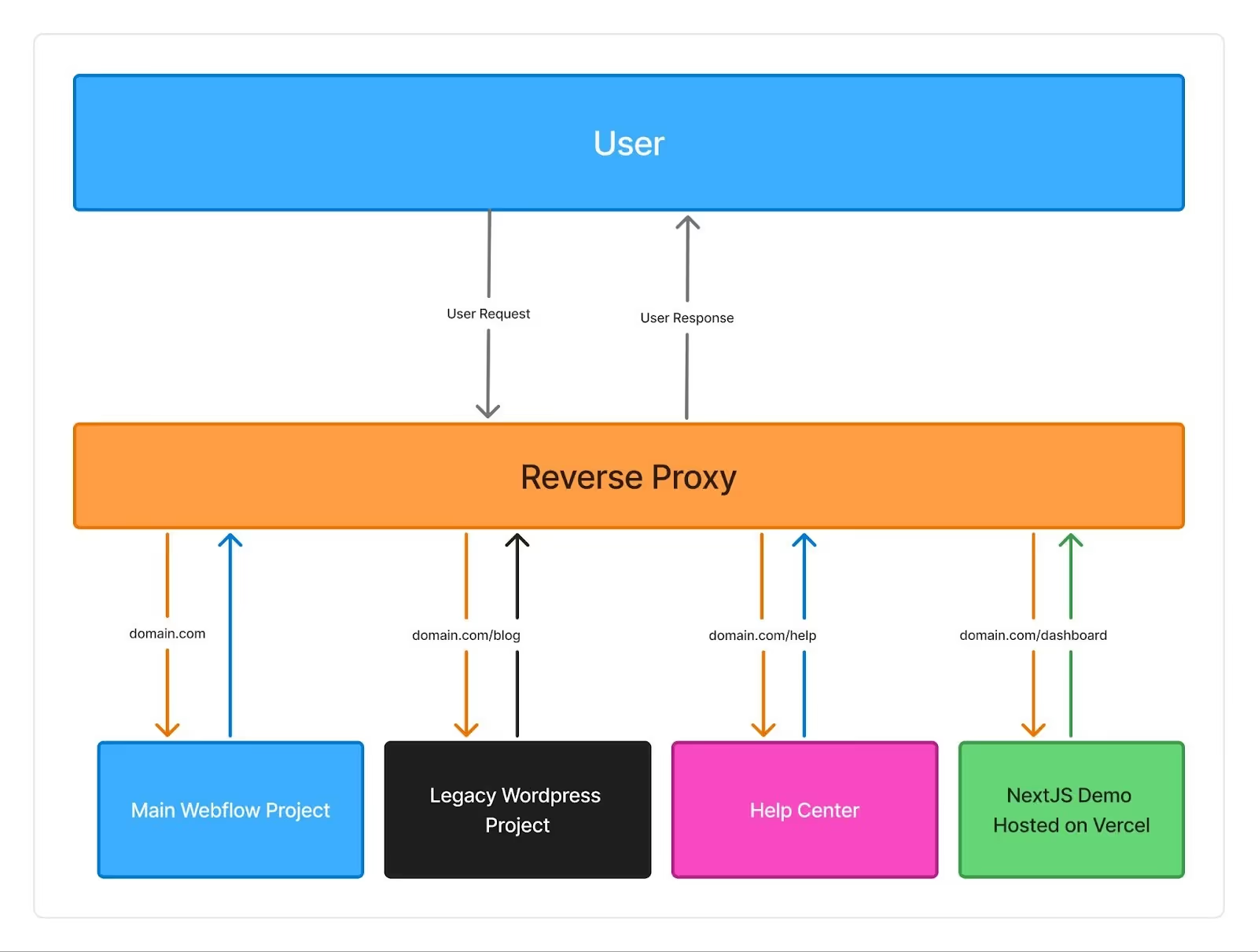
Your reverse proxy fetches the content from the right place and serves it back. One domain. Multiple sources.
Why This Matters
1. Enterprise Deals
Big companies don't do subdomains for their main properties. They just don't.
When Coca-Cola wants coca-cola.com/sustainability, they don't want to hear about sustainability.coca-cola.com
They also don’t want you goofing around on their main site, risking catastrophe.
2. Migrate in small(er) chunks
Client has a 5-year-old WordPress site and 1,200 blog articles?
Instead of the all-or-nothing Webflow migration that'll take 6 months and be 400% over budget, you can:
- Move the homepage and key landing pages to Webflow
- Leave the blog on WordPress (for now)
- Gradually migrate pages as budget allows
This is how you turn a $200k slog into five $50k projects (because you’re guaranteeing a level of safety).
3. Improve SEO (in niche cases)
With a reverse proxy, you can inject whatever you want into the HTML before it reaches the browser (or crawler). You can make an API call to an external data source, add the result to the HTML, and deliver it to crawlers, meaning it gets indexed by Google.
4. Bandwidth Becomes Cloudflare's Problem
Every request through your reverse proxy gets cached at Cloudflare's edge. Meaning your client's Webflow bandwidth barely moves. Not to mention, page load speeds improve too because they're delivered from the nearest edge location.
The Pros and Cons
Pros ✅
- Unlimited Webflow projects on one domain
- Mix any platforms (Webflow + WordPress + React + whatever)
- Modify HTML before serving (fix SEO, add scripts, inject data)
- Better performance through edge caching
Cons ❌
- Another moving part (one more thing that could break)
- Learning curve (it's not hard, but it's new)
- Cloudflare costs (~$5/month for most sites, but still)
The Alternatives (And Why They're Usually Worse)
Option 1: Subdomain Everything
- blog.domain.com, app.domain.com, etc.
- Pros: Dead simple
- Cons: Looks unprofessional, SEO implications, clients hate it
Option 2: Manual HTML Export
- Export from Webflow, host elsewhere
- Pros: Total control
- Cons: Loses CMS and Editor; nightmare process for changes; why even use Webflow?
Option 3: Just Say No to Complex Projects
- Stick to simple Webflow sites
- Pros: Easy life, referral bonuses
- Cons: Miss out on enterprise clients and interesting challenges
Option 4: Custom Build Everything
- Abandon Webflow, go full custom
- Pros: Ultimate flexibility
- Cons: 10x the time, 10x the cost, client loses visual editing, marketing teams will slash your tyres.
Who Needs This?
You NEED a reverse proxy if:
- You're working with enterprise clients who have complex requirements
- You need multiple Webflow projects on one domain
- You're doing a phased migration from another platform
- You need serious SEO modifications beyond Webflow's capabilities
- You're building hybrid experiences (marketing site + web app)
You DON'T need a reverse proxy if:
- You're building simple marketing sites
- The client is fine with subdomains
- It's a small business that just needs a web presence
- Your client has only ever had one website.
"What's the Skill Level Required?"
You need to be comfortable with:
- Basic JavaScript (if/else statements, fetch requests, async/await)
- Copy-pasting code and changing values
- Following documentation
- Moving slowly and testing aggressively.
You DON'T need to:
- Be a backend developer
- Understand servers deeply
- Know DevOps
- Have a computer science degree
The Path Forward
As Webflow pushes further into enterprise, as companies demand more sophisticated setups, and as the lines blur between marketing sites and web apps, this skill will serve you well.
In the following article, we'll build your first reverse proxy. It'll take 30 minutes, and by the end, you'll have multiple Webflow projects running on one domain.
P.S. it will suck and not be client-ready, but you’ll learn the foundations.
After that, we'll progressively build on it. Catching edge cases, HTML manipulation, managing SEO, and creating GitHub workflows.
But first, take a breath.
This isn't as hard as it seems.
You can handle a bit of JavaScript running in the cloud.
I built a VSCode extension
Webflow Project Syncer brings autocomplete for your Webflow CSS classes and data attributes directly into VSCode.
Introducing Swiperflow
Attribute based swiper library. Create custom, CMS & Static sliders with just attributes.
Managing UI State in Webflow with JavaScript
A concise introduction to front-end reactivity, showing why data should control the UI and how to create and watch reactive variables using Vue’s reactivity system, with practical examples.
Using HonoJS with your reverse proxy
Hono.js replaces messy if/else chains with clean, readable routing to build a reverse proxy that scales
Reverse Proxy First Steps
In the next ~30 minutes, you'll have two different sites running under one URL.
Building a Webflow to Algolia Sync with Cloudflare Workers
Build an automated sync between Webflow's CMS and Algolia's search service using Cloudflare Workers.
Using Videos Effectively in Webflow (Without Losing Your Mind)
If you’ve ever used Webflow’s native background video component and thought “damn, that looks rough” I'm here for you.
Webflow + Cloudflare reverse proxy. Why and How
As more companies move to Webflow and demand for Webflow Enterprise grows, you’ll see more teams leaning on reverse proxies to solve some of Webflow’s infrastructure limitations.
How (and why) to add keyboard shortcuts to your Webflow site
A small keyboard shortcut can make a marketing site feel faster, more intentional, and “app-like” with almost no extra design or development
Useful GSAP utilities
A practical, code-heavy dive into GSAP’s utility functions—keyframes, pipe, clamp, normalize, and interpolate—and why they’re so much more than just shortcuts for animation math.
Using Functions as Property Values in GSAP (And Why You Probably Should)
GSAP lets you pass _functions_ as property values. I've known this for a while but never really explored it particularly deeply. Over the last couple of weeks I've been testing, experimenting and getting creative with it to deepen my understanding.
Organising JavaScript in Webflow: Exploring Scalable Patterns
Exploring ways to keep JavaScript modular and maintainable in Webflow — from Slater to GitHub to a custom window.functions pattern. A look at what’s worked (and what hasn’t) while building more scalable websites.